
Essential Tips for a Successful Work-from-Campground Experience and Must-Have Gear
- Karen Israel
- Dec 19, 2025
- 5 min read

Updated: Dec 20, 2025
This post may contain affiliate links, meaning I receive a commission if you purchase through my links, at no extra cost to you.

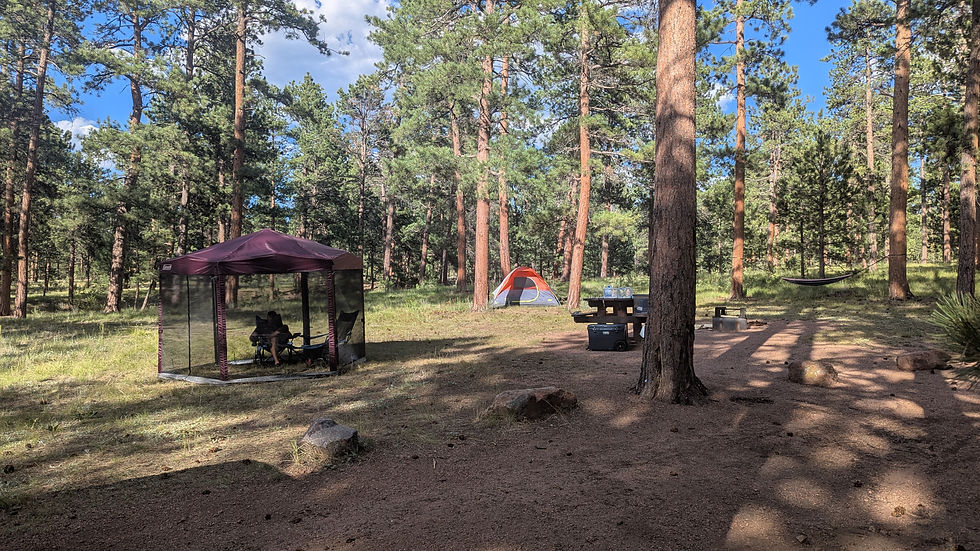
While I've spent plenty of time working in hotels, Airbnbs, coffee shops, the car, and a few hours outdoors here in there, I had yet to do a full day at a campsite. For a first outing I wanted to pick somewhere close by just in case I ran into unexpected issues. After researching a bunch of campgrounds nearby, I settled on Colorado Campground near Woodland Park, Colorado. This was just a few miles outside of Woodland Park and not far from Colorado Springs. The campgrounds were spacious and since we were here mid-week, there weren't a lot of people. I'm used to camping higher in the mountains where the weather is cooler so I was grateful for all the trees here supplying us we shade from the summer heat.

Preparing for Remote Work in the Outdoors
Choosing the Right Campground
You'll need access to WiFi to work. I generally use Starlink for this but you can also use a hot spot on your phone or even campground WiFi if they provide it. Be careful though, just because there is WiFi doesn't mean it is strong enough to work off of.
While being immersed in nature is always ideal, it's good to have a backup plan in case you have issues. I wanted to be a short drive away from town for this trip in case my Starlink had issues or my power station didn't last as long as I expected.
Finding a quiet campground is also important. You don't want to be on a call while the campers next to you are blasting music. Look for a campground that offers space in between the campsites.
Packing Smart for Productivity
Being productive at a campground often means bringing some extra gear with you. You don't want to be setting up heavy items all the time though so look for options that are light or multi-purpose. I use my camp chair and a small folding table as a desk. It's not fancy but it's enough for what I need. You can also just work at the picnic table if one is provided at the campsite.
Some campgrounds will provide power but even if they do, I recommend having a portable power station. I have two. My Ecoflow Delta 2 is my go-to as it can keep me charged for days! Paired with the Ecoflow 220W Portable Solar Panels, I'm good for even longer. I also have the Anker Solix C300 but I tend to keep this in the tent for charging our phones and other devices at night unless I need the portability it provides.
Having a shelter is also important. This was my first time using my Coleman Screened Canopy but it was a lifesaver. There were quite a few flies at this campground so having the screen to keep them out was necessary. I was also grateful for the shade as it was getting well into the 80s on this trip and the Colorado sun is no joke!
Setting Clear Work Boundaries
It can sometimes be hard to keep your focus when your working from somewhere beautiful. Setting clear work times can help with this. Depending on the flexibility of your job, you might try to adjust you work hours to have time in the morning or evening to explore. You can even add a little time on each end and take a long lunch to have time for a hike in the middle of the day!
The more you can minimize distraction, the more productive you'll be. Much like keeping a clean desk at home or in the office, keeping your campsite (somewhat) organized can help you focus on just getting the work you need to done. Don't forget to look up from your computer every now and then though to enjoy the beautiful place you are in. We even spotted a few deer wandering through the campground on this trip.
Creating a Functional Outdoor Workspace
Selecting the Workspace Location
The spot you choose to set up for your work day is important. Aim to find a flat spot so you aren't constantly having to readjust your work set up. Finding somewhere shady so you can be comfortable is also important - not to mention makes it easier to see your screen!
Find somewhere quiet to minimize background noise and distractions. The nice thing about being in a campground during the day in the middle of the week is either the campground isn't full or the people that are there are off exploring. This means you can usually find some quiet with out much trouble.
Having a solid foundation for your laptop is so important. A picnic table can do the trick or you can bring your own folding table. I love my small portable folding table. It's exactly what I need and the legs can be adjusted if the ground is uneven. It can also be shortened and used as a night stand in the tent!
Essential Equipment for Outdoor Working
Using laptops with good battery life mean charging it less. Although, sometimes you can be at the mercy of your company here if they don't replace laptops often.
Setting up Wi-Fi extenders or mobile hotspots for stable connection. I've used my hot spot on GoogleFi with pretty good success but Starlink mini is always my first choice for interney.
Dual screens! I have two big monitors that I use when I work from home. I'm not about to bring something like that with me but these travel monitors are almost as good and allow me two have two or even three screens!
Power Management Strategies
Combining solar chargers, battery packs, and campground electric hookups.
Scheduling power-intensive tasks during optimal battery availability.

Overcoming Challenges of Working Remotely at a Campground
Dealing with Unpredictable Weather
Be prepared to work in your tent or your car is the weather becomes too much.
Some campgrounds will have offices or lounges where you can work in bad conditions.
If it gets bad enough, head to the nearest town and find a coffee shop to work in until the weather clears.
Balancing Work with Outdoor Activities
Use your breaks for short hikes or nature exploration to recharge mentally.
Avoid burnout by clearly separating work time and leisure time.
Incorporating movement to stay active and reduce screen fatigue. Even just a quick walk through the campground can help!
Handling Connectivity Issues
Have offline work tasks ready for times of poor reception.
Identify nearby locations with better cellular signals as backup.

What Made the Trip Successful
Effective Time Management
Sticking to a consistent daily routine to harmonize work and relaxation.
Having a work set up where I was comfortable and able to work efficiently.
Maintaining Work-Life Balance
Purposefully disconnecting from work after hours to enjoy nature. That's the whole reason we were out there!
Embracing Flexibility and Adaptability
I had a backup plan for my backup plan to make sure being out here wouldn't affect my ability to work productively.


Comments