
My Work From Anywhere Setup

Updated: 6 hours ago
It’s easy to see someone working outside and think “that just isn’t for me” or “I could never do that”. Well, I’m here to try and change that! You don’t need fancy equipment to get started! Especially if you only want to go out for a few hours at a time. Maybe you want to take a call or two from your backyard while you sip your coffee in the morning. Or perhaps you want to sneak away a little early for a weekend camping trip but you need to follow up on a few work items once you’re there. You might even want to do multi-day remote work camping trips but you just don’t know where to start and get overwhelmed by all the options out there. Let me help relieve some of the overwhelm! I’ve tried out many methods of outside work over the years and have continually improved my set up as I went. This is a collection of the equipment I actually use and recommend for working remote from the road. These will work whether you are in a campground in the mountains, a cozy Airbnb, or a picnic table overlooking a national park.

This post may contain affiliate links, meaning I receive a commission if you purchase through my links, at no extra cost to you.
Quick Navigation

Tech Essentials
Laptop
I have been a fan of Dell laptops for years. The laptop I currently use is the Dell Inspiron 16. It's a few years old and doesn't look like it's being sold anymore so this is the closest match currently on the market: Dell 16 Plus.
Pros/Cons
What I appreciate most about this laptop is the large screen and good battery life. Obviously screen size requirements will vary based on your needs but no matter what you do for work, the better the battery life, the longer you will be able to go between charging and that is key here. I also find this screen has less glare in the sun than other laptops on the market.
This isn’t the most portable laptop. There are times I wish I had something smaller and lighter but when I’m actually working, the large screen is worth the extra weight to me. The cost is another downside to the laptop. When I was shopping for laptops, I wanted to have something powerful enough for photo and video editing. If most of what you use a laptop for is web based, something less powerful will work just fine.
Portable Monitor
I need two screens to function. Much of my job requires me to compare complicated data and that is just not something that can easily be done on a single screen. Because of that, having a travel monitor is a non-negotiable for me. I bought the Uperfect Laptop Screen Extender for a triple screen setup thinking I could benefit from having three screens in my setup but since I’m being brutally honest here, I never use the third screen. I could have saved myself a good amount of money and just bought the single screen version. I recommend having one that clips on to your laptop for a few reasons: 1) I like having the travel screen at the same level as my laptop screen 2) it feel sturdier to me and is easier to look back and forth between 3) it folds up so nicely and can be left attached if I’m just making a quick move.
Noise Canceling Headphones
I generally don’t like using headphones when I’m working. I need quiet to focus and even music is too much of a distraction to me. With that said, there are situations where I will use white noise to drown out the sounds around me. I currently have Justin's very old Bose over the ear noise canceling headphones and they are still going strong but if I were to upgrade them, I would get these: Bose QuietComfort Headphones
Wireless Mouse
A wireless mouse is the one of the most important tools in my remote work setup. I hate using the laptops touchpad for more then checking a few emails. I’ve been using this Logitech M705 Marathon Wireless Mouse for years and I love it so much I bought a second one so I could have one at home and one in my work backpack at all times. I’m not risking leaving this behind!

Power & Charging
This is a big one! Even the best laptop is only going to last for a few hours on a single charge. Being able to keep it powered all day or for multiple days requires some extra items.
Portable Power Station
I want to be so sure that I have enough power that I have two power stations and battery pack. Each were bought with different purposes in mind so I’ll explain each one and give advice for you to pick what works best for you.
The first power station I bought was my largest one with 1024Wh, the ECOFLOW Portable Power Station DELTA 2 . I knew I wanted to be able to work remotely for days at a time so I bought a large one to make sure I could have power for several days. This one is great but after dragging it through too many hotels to charge it back up, I decided I really need something more portable.
That where my Anker Portable Power Station SOLIX C300 came in! With 288Wh, this one is small and light and can easily go wherever I go. I also bought this handy Waterproof Travel Bag that allows you to access all the ports on the front without taking it out of the bag. I wish I didn’t have to take it out to charge it but that’s a very small complaint.
Finally, I have my Anker Laptop Power Bank. I originally bought this when I was hiking the Inca Trail as I wanted the largest battery pack that I could take with me on an airplane (25,000mAh). Since then, this has been on many trips and is perfect when I need a quick charge on my laptop! This little guy will give me about one full charge made it perfect for a half day working session outside.
Car Charger
Whether you are lucky like me and have a partner that will drive while you work from the car, are just driving long distances on a road trip, or need a backup options for keeping everything charged up, having a car charger/ inverter is so helpful. First, for my laptop, I have this handy little 150W Power Inverter that allows me to charge the laptop through the cigarette lighter in my car. I also have a charger my power stations that came with my ECOFLOW DELTA 2 power station that plugs into the cigarette lighter. When I work from the car, I like to have the Anker SOLIX C300 power station plugged in while the car is in motion and then I just plug everything I need powered (laptop, Starlink, etc) into the power station. If I just wanted to charge while I drove, I could plug it into the outlet in the back of the car freeing the front one up.
Solar Charger
I love my solar panels! They make it so easy to keep my power stations charged up. I currently have the ECOFLOW 220W Portable Solar Panel and it works so well. It has enough wattage to power even my large power station from empty in around 6 hours. I usually don't wait until it's empty though and charge it up whenever I have the opportunity. I am also in the market for a small solar panel that I can bring with me. I am looking to buy the SOKIOVOLA 100W MC-4 Foldable Solar Panel as something that is portable and can go on hikes with me. Weighing less than 5 pounds and still giving 100w of charge, this seems to be a great option for taking with me on hikes for more remote work options.
Power Strip & Extension Cord
These are the sort of things you don’t realize you could use until you have them. How many times have you been in a hotel and there weren’t any plugs near the bed (or you had to unplug something to access one)? How about a coffee shop where the nearest plug is just a little too far way for you charger to reach? Having a few options can make a huge difference in your comfort and productivity. If you plan to use the power at at campground, I would recommend a surge protector. You don’t want to risk your laptop or power station being friend if these aren’t hooked up correctly.

Internet & Connectivity
Alright, now that we have covered all the ways to keep you charged up, lets talk internet. Most jobs today are going to require a strong internet connection. There are a few ways to accomplish this depending on your needs.
Coffee Shop
The most commonly thought of option is to go to a coffee shop or other establishment that offers WiFi to customers. With this, of course, you run into the added cost of being a customer and I am looking to venture further than just another building. There are times, such as on road trips where I’ll stop in a coffee shop in between travel times but that’s the less common option for me.
Starlink
This is my go to method. I have had Starlink for a while now and have used it all over the US and even in Canada! Here is the my referral link to the Starlink Mini. Use this link to get your second month of service free! If I’m stationary, I just set it up on the ground with a clear view of the sky. For when I’m in the car, I have this handy mount for the sun roof - Spigen for Starlink Mini Mount!
Aside from the sun roof car mount, here are a few other accessories I’ve bought for Starlink that make my life just a little easier:
USB cable: Save yourself from losing energy from DC to AC to DC conversion and use a USB C cable instead of the AC adaptor with the power stations. I bought this 6.5ft one a I wanted something shorter with less cable to get tangled. I was working under a tree recently and having a short cord meant I couldn't have the Starlink and power station right next to me (and I needed the power station to charge my laptop). Overall I still prefer the shorter cable but something to consider if you plan to work in wooded areas where finding a clear view of the sky can be more difficult.
Carrying case: You want to make sure to keep your investment safe! This Ultra-Light Case for Starlink Mini allows me to easily transport it and the cable without having to worry about it getting beat up.
Cover: I frequently throw the Starlink in my backpack when I going to beautiful locations. I don’t want it to get scratched up in there so I have a Silicone Protective Case to keep it safe. I was worried it would affect my signal but it hasn’t caused any issues at all and I love knowing it is safe.
Suction cups: Don't have a sunroof in your car? No problem! These little guys allow you to mount it to the rear or front windshield and were what I used for years in my previous car since it didn't have a sun/ moon roof. Make sure it is safe and legal to place it on the front or rear windshield before doing so.
Hotspot
When I first started working from the car/ remotely, I would use the hotspot on my Google Pixel using GoogleFi. I was amazed my first time using it in the car that was able to work and even make Teams/ Zoom calls while in motion! Of course, this is only as good as the cell service in the area and is not great for remote locations. I now treat this as my backup should I want internet without having to carry Starlink around with me. Usually this is when I’m stopping at a park or somewhere close to civilization.
Offline Tools
Whenever possible, download as much as you can for offline use. Want to have music to listen to while you work? Download your playlist ahead of time. Are you going to be driving somewhere with limited service? Download offline maps (I’d recommend this no matter where you go, honestly). Do you plan on stopping for a hike somewhere? Download the map on AllTrails before starting out.
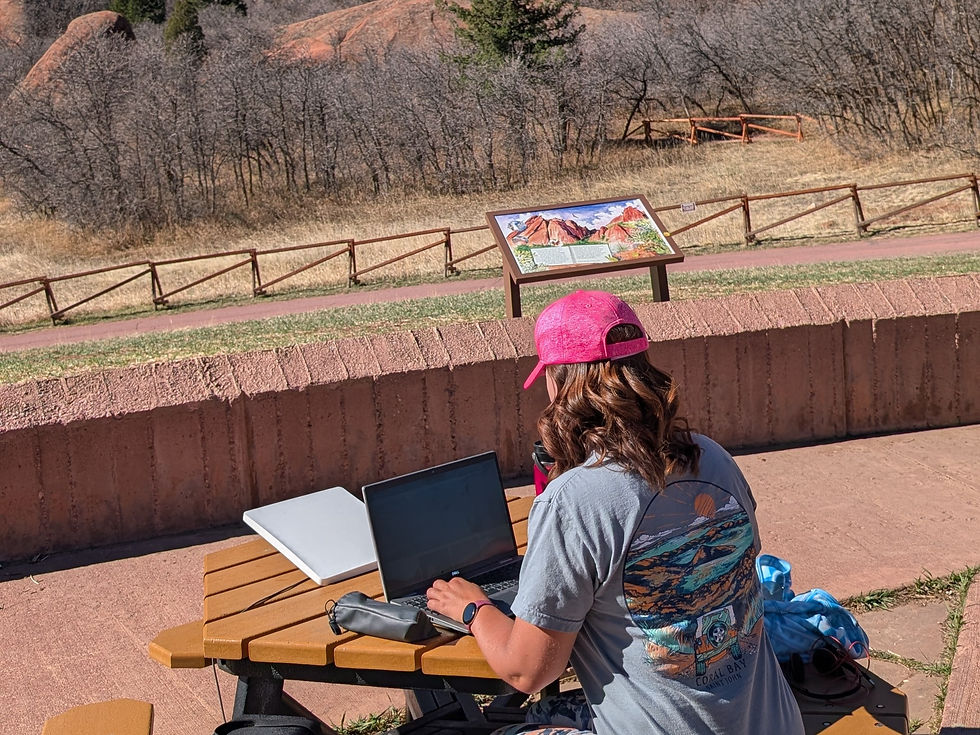
My Outdoor Office Setup
Now that we’ve covered all the essentials for being productive anywhere, lets get to some of the fun stuff and how you can be comfortable anywhere.
Camp Chair
Often times you can find a nice picnic area to work from but sometimes either there just aren’t any available or you’d rather sit somewhere further away from people or somewhere with a better view. That’s where having your own chair comes in handy. Typically any camp chair you already have will do the trick. The one I personally use is unavailable but this one looks similar. It has a removeable leg rest and can recline! Perfect for work days, campfires, and relaxing on my lunch break. It is a little heavy though so I also have the REI Flexlite Camp Boss chair for when I need something portable! It is super light and sets up very quickly. I read a lot of reviews for similar chairs that they were difficult to set up. This is is so easy!
Foldable Table
Now that you have something to sit on, let’s talk about something to work on. Sure, you could set your laptop on your lap but that just isn’t the same as having a table to work set your stuff on. A small folding table like this will work great. I love how small and compact this one gets and the feet are adjustable which is perfect for uneven ground. I’ll even use this one for extra space around camp or shorten the legs and use it as a night stand for sleeping on my cot in the tent. The fun patterns are an added bonus to add a little whimsy to my work setup.
When I do have my laptop on my lap, I love having my AboveTEK Portable Laptop Lap Desk. It has a slide out tray for your mouse (did I mention how badly I need a mouse to work!?) and it can slide out to either side so it's great if your right or left handed.
Blanket/ Layers
The weather can be quick to change on you when you’re working outside. Having a few key pieces and layers can make or break the experience. Here are my recommendations:
Blanket: Who doesn’t love being cozy on a chilly summer morning in the mountains? I just bring the Twin XL blanket that I got for my college dorm room. You don’t need anything fancy here. If you do want something fancy, this puffer blanket has great reviews and is on my wish list!
Puffer coat: You don’t want to cold sitting outside. I love my Cotopaxi puffer coat because it keeps me warm and packs down small. It even has it’s own pouch built in, making it great for travel!
Rain jacket: Whether it’s for the rain or simply to use as a wind breaker, a good rain jacket is must have. Of course, you aren’t likely to be working out in the rain, but an extra layer is always a good thing to have.
Coffee Mug or Travel Thermos
I don’t know about you, but I’m useless without my coffee even when I’m working somewhere beautiful so I have to have my coffee! Most of the time, I am a HydroFlask girl but I was given a Yeti thermos from a company I used to contract for and it has become my go-to travel mug!
I couldn't take one more cup of instant coffee while camping so I bought these Collapsible Pour Over Coffee Drippers and they have been a game changer! Now I can make good coffee anywhere!

Camera & Content Creation Gear
Camera
Most of the content I take is done on my Google Pixel 9 Pro. I have been a Pixel fan for years and the camera quality on these phones is excellent.
The best photos on my blog and Instagram page were taken by Justin. He is the photographer and has the eye, knowledge, and the gear to take amazing photos. Below is the camera he uses as well as his go to lenses:
Camera: Canon EOS R5 Mirrorless Camera
Landscape Lens: Canon RF24-70mm F2.8 L is USM Lens
Super Telephoto Zoom Lens: Canon RF100-500mm F4.5-7.1 L
GoPro
My GoPro Hero 10 is one of my favorite devices for getting good content. I’ve been using it for years to get underwater footage while snorkeling, action footage while ziplining or biking, and to film time lapses of my hikes or scenic drives. The model I have is about 4 years old at this point but it still works great (much to my dismay as I really want the 13 with the interchangeable lenses!). Here's a link to the current model.
Below are some of the accessories that I use the most:
Neck mount: This is my most used accessory! I use this on every hike to get POV footage as well as doing things like kayaking or even biking. ULANZI Go Quick II Magnetic Neck Mount
Floaty handle: This is a must have for snorkeling. Not only does it make it easier to see what I'm taking video of, the wrist strap keeps it secured to my wrist and, should I somehow drop it, it will float upside down so the orange at the end is visible in the water. The Handler (Floating Hand Grip)
Dual charger: I highly recommend getting an official GoPro battery charger. I originally bought a 3rd party one and after have multiple batteries get ruined by it, switched to the official one. I have this one but for the newer GoPro, this is the latest version.
Case: I definitely don't want my GoPro getting scratched so I have a case to store it. I can't find the one I bought back in 2022, however, this one looks to be very similar.
Handlebar mount: For biking, I will often use the handlebar mount. Although, it has gotten less use since I bought the neck mount. GoPro Handlebar / Seatpost / Pole Mount
Flexible mount: This mount is useful in some of the most random ways. I've used it on a swamp cruise in Louisiana to mount my GoPro to the side of the boat. I've mounted it to a beach chair to take footage from the beach. I keep wanting to mount it to the wire fence of the pickleball courts to get some footage there too. The possibilities are endless and since it's so small, it's easy to just toss it in your bag to have on hand. GoPro Flexible Grip Mount
Car mount: I use this on my car's dash both for my GoPro to get driving footage or to put my phone in on long roads trips. It has cracked a bit over the years but I'm sure that's because it wasn't built for the weight of my phone. If I had just used it for my GoPro, it would probably be fine. Flexible Gooseneck Suction Cup Car Mount Holder
Drone
Generally we don’t do a lot of drone footage as most of our exploring is done in national parks or other places where they aren’t allowed. However, when we are somewhere that allows it, we use Justin's DJI Mavic. The latest model is the DJI Mavic 4 Pro. With the latest model, it comes with a remote that has a built in screen which is preferable to the model Justin has which requires you to use your phone as the screen. Since the app doesn't meet the security standards for the Google Play Store, it has to be downloaded from the web. Seeing as we both work in the cybersecurity field, any app that doesn't meet the security standards for Google is a red flag for us.
Tripod
I love my tripod for solo travel! The EUCOS 62" Phone Tripod has been such a game changer for me. It is small enough to fit in my backpack but sturdy enough for most adventures. It does occasionally fall over in high wind but that would be true of any lightweight tripod.
Editing Apps & Software
For editing I tend to keep it simple. I’ll use the built in editor in Google Photos for pictures I take on my phone. It’s a very powerful tool so I am thankful to have it included on my phone! To create posts and reels, I rely on Canva. It provides templates and tools accessible both in the app and the web version. I appreciate its user-friendly nature, and as I become more familiar with it, I can incorporate more fun and interesting elements into my posts.

Favorite Apps & Tools
There are a few apps that I use all the time and can’t imagine getting through a trip with out!
Google Maps: I have the worst sense of direction so Google Maps (and offline maps!) save me frequently from getting lost in a new place
AllTrails: I do have the pro version so I can download offline maps. It is so helpful so I can always remain on the correct trail and will warn me if I venture off course. Did I mention my bad sense of direction?
Spotify: I need my road trip playlists! Spotify Premium is great to be able to save my playlists offline so I can have them even when cell signal is week or nonexistent.
Canva: I do all my content creation on Canva. Their tools make it easy to build beautiful posts in no time at all and I love being able to save the photos I’ve uploaded to specific folders to be able to easily find them when I need them.
Libby: This app partners with my local library and gives me access to audiobooks and ebooks wherever I am. Another good Library app is Hoopla - check with your local library and see what digital content they offer!
Kindle: When I do read ebooks, I prefer to read them on my actual Kindle but it can be nice to have the app on my phone to so I can easily pick up where I left off.
National Parks Service (NPS): I love being able to download the park page that I am visiting. It allows me to look up trails, visitor centers, and anything else I want to know about the park even without service.
Recreation.org: I book most of my campsites through here. It makes it easy to search for both reservable and first come first serve spots.
Honorable Mentions
Airbnb
VRBO
Viator
Expedia
United Airlines
MyTSA
Lyft
Uber
Hipcamp
Starlink
The Dyrt

Frequently Asked Questions
How do you get internet while traveling?
Starlink is always my first choice. Occasionally I’ll use the hotspot on my phone or WiFi at a local coffee shop but neither of those are my preference.
How do you charge your devices while camping?
My power stations are always my first line of defense. In the unlikely event that I run out of power in all of them and cannot use my solar panel to charge them, I will plug them into the car to get the boost that I need. I love when I am at a campground with hookups so I can charge everything right there at my campsite (highly recommend a surge protector for this) or I will stop at a hotel from time to time and recharge all my devices.
Do you work full-time while traveling?
As much as I would like to travel full time, that’s not really an option for me right now. I do frequently take long weekend trips and sometimes even longer and work from beautiful locations. Many of the longer trips I use PTO but I will frequently work a day here and there while I’m out (or in the car) to make the most of my very limited vacation time.
What’s you favorite place you’ve worked remotely from?
I love this question but it so hard to answer! I would have to say my favorite place was Saguaro National Park. I’ve always had an obsession with the Saguaro cacti, so getting to work from the park, surrounded by them, was truly special.
Is remote work from nature realistic?
Absolutely! If you have the right gear, it is completely realistic. I do my best work in nature and am my happiest, most productive self. Yes, it’s a little unconventional, but we live in a world where technology has grown to a point where this is 100% attainable.

Quick links
Below are the links to some of my favorite and most used items mentioned above:

Final Thoughts
Working remotely in nature has completely changed the way I travel. It’s allowed me to explore more places and spend more time in these destinations than I would have been able to otherwise. I strive to build a lifestyle that blends adventure with everyday life. My setup isn’t about having the fanciest gear but about creating a system that lets me work efficiently while still making time to get outside and explore. I hope this has helped you get some ideas of how you too can take your office outside but if you have any more questions, I'd be happy to answer them in the comments or message me on Instagram @9to5AdventureLife. I look forward to seeing you out there!

Pin this page to help you plan your own work from anywhere setup!



Comments